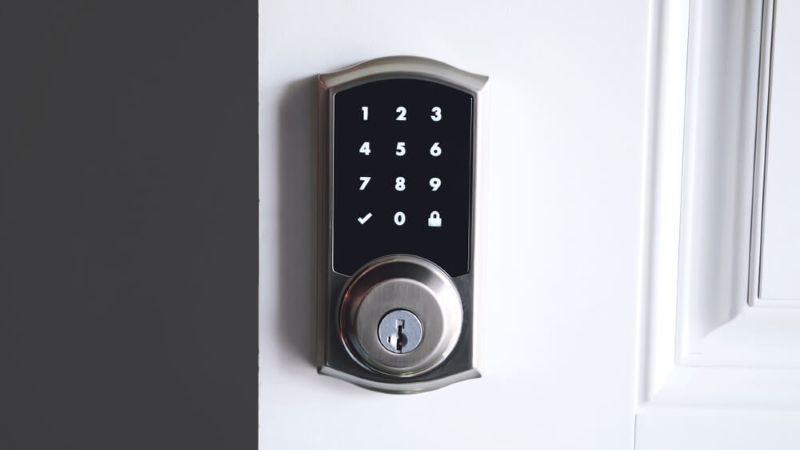
Smart locks are popping up everywhere these days. People like them because they make life easier, give you more control, and add a layer of security you just don’t get with a regular lock. You can open your door with your phone, punch in a code, use your fingerprint, or even just ask your smart speaker. Pretty cool, right? But here’s the catch: they all run on batteries. And yeah, that can make people a bit nervous. What if the battery dies?
This blog will walk you through what to expect, how to deal with it if your lock suddenly stops working, and what you should do to avoid getting caught off guard.
What Actually Happens When the Smart Lock Battery Dies?
Don’t worry, your smart lock won’t just quit without warning. Most models give you plenty of heads-up before the battery goes flat. You might see a warning in the app, a flashing light, or hear a beep every time you use the lock.
If you ignore those signs, the lock will eventually stop responding to your app or keypad. At this point, people usually start to panic and think the lock is busted. But your door is still secure—the lock just stays either locked or unlocked, depending on how you left it.
Read More: Smart Doorbell Camera Automation Guide For Everyday Homes
Why They Use Batteries in the First Place?
Almost every smart lock relies on batteries instead of being wired into your house. It makes installation a breeze—no need to mess with your walls—and your lock still works even if the power goes out. The batteries run the keypad, the motor that moves the bolt, the sensors, and all the wireless stuff.
So, when the battery dies, your lock isn’t broken. It just doesn’t have enough juice to do its thing. Once you know that, it’s easier to stay calm and deal with the problem.
Can You Still Get In If the Battery’s Dead?
Getting locked out is probably everyone’s biggest worry. The good news? Most smart locks have a backup.
A lot of them hide a regular keyhole behind a panel, just in case. Some let you hook up a 9V battery to give the lock a quick burst of power so you can get inside. It’s worth figuring out which backup your lock has before you ever need it.
And if you do have a physical key backup, don’t just toss the key in a random drawer. Keep it somewhere safe but handy. It’ll save you a ton of hassle if your lock ever stops working.
How do You Know the Battery’s Running Low?
Smart locks are smart about this stuff—they give you signals. Maybe the lock starts reacting more slowly, the beeps sound weaker, or your app keeps bugging you with notifications. These warnings usually show up days, sometimes weeks, before the battery actually dies.
If you ignore them, you’re asking for trouble. Paying attention and swapping the batteries on time means you’ll avoid getting locked out and won’t need to scramble for a solution. Honestly, just make a habit of checking the battery level every now and then. It’s worth the tiny bit of effort.
How to Change the Battery?
A smart lock battery replacement is about as easy as changing the batteries in a TV remote. Most take AA or AAA batteries, though a few use rechargeable packs. Just pop open the inside panel, pull out the old batteries, and put in the new ones—make sure you get the direction right. After that, test the lock to make sure everything’s working.
Change the batteries before they completely die, and your smart lock will stay reliable. No drama, no fuss.
What Happens If Your Smart Lock Just Stops Working
People get nervous when their smart lock’s battery dies—like maybe the lock is ruined for good. Honestly, that’s almost never true. When the battery dies, the lock itself is usually fine. Just pop in fresh batteries, and most locks come right back to life.
If you’re still stuck after swapping batteries, try the basics: restart the lock, reconnect the app, or see if it needs a firmware update. Knowing how this works helps you stay calm if your smart lock ever stops working.
Recommended Blog: How Smart Security Can Improve Family Caregivers' Safety?
Opening Smart Lock Doors in an Emergency
You really don’t want to be locked out because your battery died. That’s why it pays to know your backup options ahead of time. Some smart locks let you connect an external battery for a quick power boost. Others keep things simple with a regular key. A few high-end models even let you enter emergency codes stored inside the lock.
If you get familiar with these backup methods before you actually need them, you’ll feel a lot more in control when things go sideways.
How Long Do Smart Lock Batteries Last?
Battery life isn’t the same for everyone. It depends on how often you use the lock, what kind you have, and whether it’s always connected to Wi-Fi or Bluetooth. Usually, a battery in an electronic lock lasts anywhere from six months to a year.
If you use the lock all the time, live somewhere cold, or have it connected 24/7, the batteries will run down faster. Regular battery checks help you avoid those annoying surprises.
Honestly, it’s better to switch out the batteries a little early than to get stuck outside with a dead lock.
How to Avoid Smart Lock Battery Trouble
The best fix is to stop problems before they start. Set reminders to check your battery levels every few months. Turn on app alerts, so you know when the battery’s getting low. Always go for good-quality batteries. Cheap ones can leak or die faster—then you’re right back where you started.
A little effort now keeps your smart lock working smoothly and saves you a lot of headaches later.
Are Smart Locks Still Safe If the Power’s Out?
People worry about security when a smart lock’s battery dies. Here’s the good news: almost all smart locks stay locked when the battery is dead—they don’t just pop open.
So your home stays safe. Only someone with the right backup method—like a key, code, or battery—can get in. That’s a big reason to feel good about using a smart lock, even if you’re not great at remembering to change the batteries.
This built-in safety feature is one of the things that makes modern smart lock troubleshooting reliable.
Check This Out: Smart Door Lock Security: Are Smart Locks Safe From Hacking?
Final Thoughts
A dead battery doesn’t mean your smart lock is toast. Most locks give you plenty of warning, stay locked, and have backup ways to get in. When you know how your lock works, it’s way easier to keep your cool and fix things fast.
Learn your lock’s emergency options, swap out the batteries before they’re gone, and keep an eye on their level. These simple habits make smart locks way more reliable—and way less stressful. With a little know-how of smart lock troubleshooting, you get all the convenience of smart security without the drama of lockouts.
FAQs (Frequently Asked Questions)
What happens right when the smart lock battery dies?
Smart features stop working, but the lock stays secure.
Can I still get in if my smart lock isn’t working?
Yes. Most smart locks come with backup keys or an external battery port, so you can still get inside.
How often should I replace the smart lock battery?
About every six to twelve months, depending on how much you use it.
Does a dead battery wreck the lock?
Nope. Put in a new battery, and it should work like normal.